MODULE MAP
CS2 ESP, aimbot & every module
Render ESP, skeletons, aimbot, triggerbot, recoil control, radar, bomb ESP, stream-proof, and configs.
// The menu
Insert opens the client. Drag the top bar to move it.
Render
// Awareness
World overlay drawn outside the game process.
- ESP Master toggle for boxes plus nested options: health bars, names, weapon icons, armor, equipment, show teammates, hover highlight.
- Skeletons Own module with its own show teammates and hover highlight settings.
- Bomb ESP Shows plant site, fuse countdown, and defuse timer.
- Radar Top-down player dots relative to the local player and orientation.
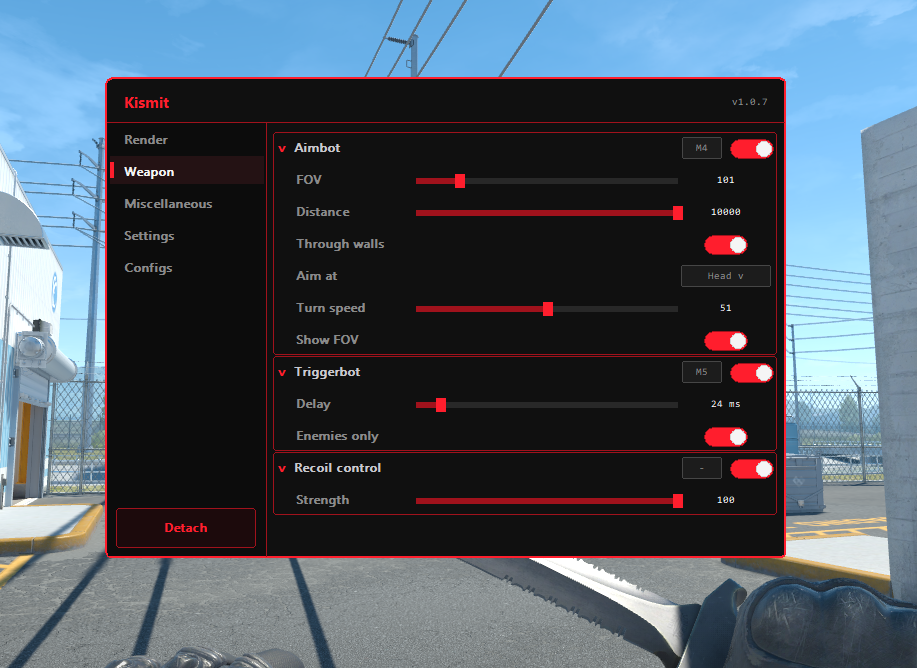
Weapon
// Aim & spray
Mouse-driven assists via SendInput — no write into the game.
- Aimbot FOV based aimbot with target selection (head / shoulder / body), max distance, wall filter, turn speed, FOV ring and support for built in recoil control script.
- Triggerbot Hold down the trigger key to fire when a player is in the crosshairs.
- Recoil control Recoil control with strength slider and light built-in jitter on compensation.
- Sniper crosshair Adds a crosshair when holding an AWP or Scout.
- Recoil crosshair An extra crosshair that follows the recoil while spraying.
Client
// Settings & configs
Session persistence and overlay behavior.
-
Named configs
Save / load configs under
%APPDATA%\Kismit\configs\plus sessionkismit.cfg. - Stream-proof Exclude the overlay from capture so Discord / OBS don’t show the menu or ESP.
- Custom Theme Change the color of the menu and other UI elements to your preference.
- Per-module keybinds Customizable keybind for all modules
- Menu / detach First launch sets your menu and detach keys; defaults are INSERT / DELETE.